Veteran Appointment Request App Promotional Ad

Case Study: Veteran Appointment Scheduling App

DISCLAIMER: In compliance with my Non-Disclosure, Intellectual Property, Copyright and Social Media agreements, the information provided in this case study is limited to material that has been previously published in public forums, as approved by my customer and/or my employer. While this case study represents my work and the work of my team, I am extremely limited in what I can share on this website. Graphics in this case study are intentionally obtained from public sources. If this case study interests you, please connect with me privately for additional discussion.

Summary

VA Online Scheduling (formerly known as the Veteran Appointment Request (VAR) App) allows Veterans who are in the Department of Veterans Affairs (VA) health care system to self-schedule and request primary care appointments.[1] Our team worked with the program office responsible for this app to improve usability throughout the design, development, piloting and phased deployment.

The Challenge

This app was created by combining the features of several previous standalone apps to enable patients to enter information that had formerly been handled by VHA scheduling staff. This provided patients greater flexibility in making appointments. However, the merging of features produced a product with a potentially fragmented user experience. Our team identified this concern as part of the initial usability evaluation required to deploy VA apps. We then engaged with the program office to evaluate the app and iteratively provide feedback required to improve the overall user experience and usability of the product throughout the rollout process.

The Approach

This project evolved to address the needs and concerns of the program office as the product was developed. Our approach consisted of meeting the program office where they were in the app development process, understanding their needs for evaluation and delivering on those needs to materially improve the user experience in concert with the development team’s cycles. Consequently, our team evaluated V2.1 of the product during the initial pilot, provided recommendations for improvement and then performed a follow-up evaluation of a revised V3.0 product.

The Solution

Veteran Appointment Request App on Smartphone

Veteran Appointment Request App on Smartphone [2]

Due to project constraints, the initial V2.1 evaluation had to be conducted with a live pilot product by Veterans using their own mobile devices on test data. The study faced quite a few challenges in recruiting, participant dropout, difficult-to-analyze data, and conducting unmoderated usability testing on a wide variety of mobile device configurations. Our team maintained an attitude of continuous improvement and addressed challenges as they arose. We maintained an appropriate level of rigor and a laser focus on study objectives.

The final V2.1 evaluation consisted of a diary study to collect information surrounding the process to obtain login credentials, formative remote unmoderated usability testing of core tasks and administration of the System Usability Scale (SUS) and follow-up moderated remote interviews to collect overall feedback and ask probing questions. Ranked usability findings were used to produce actionable recommendations for improvement.

Subsequently, the program office and development team issued a new version, VAR 3.0, which addressed critical and major findings. Our team then performed a second round of usability testing on the new version. Consistent with our approach to continuous learning, our team applied lessons learned from the initial evaluation and designed a study to assess the same core tasks while alleviating study constraints.

The follow-up V3.0 evaluation consisted of moderated in-person usability testing using mobile devices consistent with those owned by the participant but running a pre-tested configuration to ensure stability during the testing. Questionnaires and administration of the SUS were also done in person, moderated using a standardized questionnaire instrument. Usability findings were identified data analysis techniques similar to those used in the V2.1 study. Identical metrics were collected for comparison and actionable recommendations were provided to the development team for additional improvements.

The Impact

Screenshot of tabular data indicating improvement of task success metrics.

The average task success rate leaped from an average of 29% to 83% between the two versions.

Many of the measures collected for both the V2.1 study and the V3.0 study indicated notable improvement between the two versions. Participant satisfaction with the app, as expressed in the System Usability Score (SUS), rose from 79.3 for VAR 2.1 to 88.5 for VAR 3.0. Additionally, while 80% of participants said they would recommend VAR 2.1 to other Veterans, 100% of VAR 3.0 participants said they would recommend the app. Most notably, the average task success rate leaped from an average of 29% to 83% between the two versions. Additionally, by including three sequential scheduling tasks of the same type in VAR 3.0, our team was able to examine the impact of learning by the participants. The majority of participants completed all three scheduling tasks and 84% felt that the app got easier to use with practice. Following these series of studies, the development team and program office continued to stay engaged with our team for continuous improvement of the user experience. This product team now values timely user research insights to drive their design decisions and alleviate program office concerns.

Details of this Case Study

When  2015-2016
My Role Study Co-Lead
Our Team Nancy WilckJohn Brown, Jane Robbins
Our Methods Diary Study, Unmoderated Usability Testing, Remote Moderated Interviews, System Usability Scale (SUS), In Person Moderated Usability Testing, Interviewing
Our Tools* Userzoom, Morae, SurveyMonkey, Mr. Tappy,  Microsoft Office (Word, Excel, PowerPoint)
* Methods and tools listed are limited to those employed by our team for user research. Other tools were used by the development team for other purposes, such as user interface design and code management.

Publications About this Case Study

Information in this case study was presented as a featured article in the VHA Human Factors Quarterly Newsletter (Winter 2017) (PDF).

Veteran Appointment Scheduling App Information

Press Releases

Footnotes

[1] See the VA Online Scheduling User Manual provided by the VA for more details on the capabilities of this app.

[2] Image borrowed from The American Legion’s announcement of the VAR app deployment in May 2017.
Case Study: VA HIT Modernization Journey Mapping

DISCLAIMER: In compliance with my Non-Disclosure, Intellectual Property, Copyright and Social Media agreements, the information provided in this case study is limited to material that has been previously published in public forums, as approved by my customer and/or my employer. While this case study represents my work and the work of my team, I am extremely limited in what I can share on this website. Graphics in this case study are intentionally obscured. If this case study interests you, please connect with me privately for additional discussion.

Summary

The objective of this project was to visualize a series of Veteran Health Administration (VA) outpatient clinical encounters from the perspectives of three different people. In this manner, we hoped to identify innovative solutions to pain points that would produce the best experience for all individuals involved and then communicate this information to decision makers. We chose to use journey mapping to visualize and communicate these experiences.

The Challenge

Information Technology (IT) development teams and executives make decisions on a daily basis that form the experience of the people experiencing these clinical encounters, including the patient and his or her care team. A lot of valuable information is available. But, it isn’t provided in an easily digestible and accessible form to help decision makers understand how opportunities or compromises in Health Information Technology (HIT) investment could affect the vision of the ideal to-be experience, specifically the prioritization of the modernization of VA’s Electronic Health Record (EHR). Developing and sharing these journey maps helps to bridge this gap.

The Approach

This project employed literature consultation, rapid ethnography, interviews and unmoderated questionnaires to collect qualitative information. This qualitative information was used to produce a rich narrative of the storyline, which was reviewed by clinical Subject Matter Experts (SMEs). Supporting information for each event, including touchpoints, was collected or generated and then visualized in the form of journey maps.

exampleJourneyMapVisualization

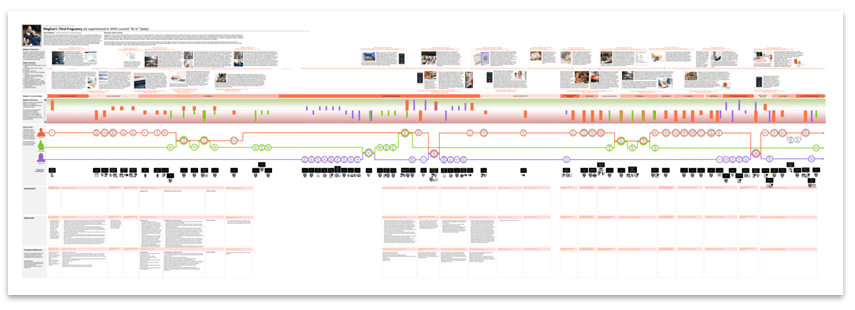
Figure 1: Example of the Visualization of a Journey Map. This journey map was developed to explore provider and Veteran needs for Primary Care and Women’s Health services delivery. The map includes visualization of the rich narrative in timeline form, vertically aligned with the emotional experiences, touchpoints and HIT as depicted in a service flow.

The team produced a coordinated package of maps of the experiences of three people (represented as validated personas). All maps depicted the same health need for one Veteran patient and mapped her perspective along with that of two VHA staff members involved in delivering her care.

  1. Meghan: Post-9/11 female Veteran experiencing the early pregnancy of her third child with her new husband, who is active duty Navy. The journey is triggered with the pregnancy diagnosis and proceeds through the resolution of a teratogenic drug issue resulting in a seizure at approximately 8 weeks post-conception.
  2. Dr. Francis: Meghan’s Primary Care Provider.
  3. Vera, RN: Meghan’s Maternity Care Coordinator.

The package contained 6 maps. Each person’s journey was mapped to show their experience in VA’s current “as-is” state and their experience in a future envisioned “to-be” state, along with the supporting HIT resources for both.

The Solution

These maps help ensure that users are at the center of VA’s organizational thinking as new Electronic Health Record (EHR) components are acquired, customized, built and/or integrated. All maps in the package are centered on the Veteran health need and the comprehensive Veteran experience through a series of diverse encounters. As such, the maps will continually encourage consideration and balance of users’ questions and needs throughout decision making at all levels.

  • Executives and other managers can use the journey maps to identify potential infrastructure capabilities needed to deliver on the future vision and make more informed decisions on impacts associated with necessary compromises in funding specific HIT investments.
  • HIT managers can use them to gain a more holistic view of the user experience, helping them to identify areas to improve and drive organizational impact.
  • Software designers and developers can use them to gain perspective on the motivations and constraints of the users of their products, resulting in a stronger empathetic bond that can translate into better software design decisions and compromises. These teams can also use the maps to prioritize fixes or enhancements and plan the roll-out of future HIT products or enhancements based on user needs.
  • Teams can use the maps to help inform communications intended for users of the systems, as well as oversight bodies, such as Congress.

In one example, the “as is” maps can be aligned with the “to be” maps to make comparisons. The maps show “Moments of Truth,” critically charged touchpoints that have potential to significantly affect the experience of the individual over the journey as a whole (either positively or negatively). MoTs can be examined for opportunities that could be prioritized above others. Using MoTs, a new VA technology was envisioned for the “to be” state as a virtual assistant, lending the power of computing to the talents of the humans. It is presented as its own touchpoint service flow and demonstrates how the experience could be improved for Veterans and clinicians with changes in all aspects of clinical experiences, including policies, procedures and supporting HIT products (hardware and software investments). These improvements directly impact the overall pattern in emotions, which can be seen as more pleasant in the “to be” experience than in the “as is.”

In another example, when maps are paired to provide the perspectives of the variety of people experiencing the same series of events, opportunities and compromises can be more thoughtfully considered, while continually accelerating decision making and innovation. The “as is” state maps for all three personas are aligned vertically to produce an even larger alignment diagram.

exampleJourneyMapMetaAlignment

Figure 2: Alignment of Three Journey Maps to Produce a Meta Alignment Diagram. Here, the maps show how, while Meghan is celebrating her pregnancy, Dr. Francis is struggling with the challenges of her workload (which caused the delay in notifying Meghan), and Vera is anxiously digging through the electronic health record for the orders from Dr. Francis to assist Meghan in acquiring maternity care from a community provider.

In this way, specific areas can be explored to fully understand the experience from multiple perspectives. In this way, a designer can accommodate all sociotechnical aspects of the experience when preparing to propose a new solution that must support needs of all personas.

The Impact

Journey maps of clinical scenarios done in this way can support prioritization of business process re-engineering needs, process improvement projects, and health information technology development. This particular package of maps is being used for EHR Modernization prioritization activities.

Details for this Case Study

When  2017-2018
My Role Validation Study Lead, Lead Journey Mapping Designer, User Research Support
Our Team Nancy Wilck, Jennifer Herout, Kyle Maddox, John BrownJolie Dobre, Abigail Noonan, Robert Gluck, Evangelene Walters
Our Methods Literature Consultation, Rapid Ethnography, Interviews, Unmoderated Questionnaires, Data Visualization, Persona Development, Journey Mapping, Focus Groups (moderated in person and remote moderated)
Our Tools MS Office (Access, Visio, Excel, PowerPoint and Project), MS Power BI, Adobe Creative Suite (Acrobat and InDesign), SurveyMonkey, FocusGroupIt, Morae, Web Conferencing (WebEx)

Publications Related to this Case Study

Information in this case study was presented as a poster at the 2017 HSR&D/QUERI National Conference (view the poster) and as a featured article in the VHA Human Factors Quarterly Newsletter (Winter 2018).